

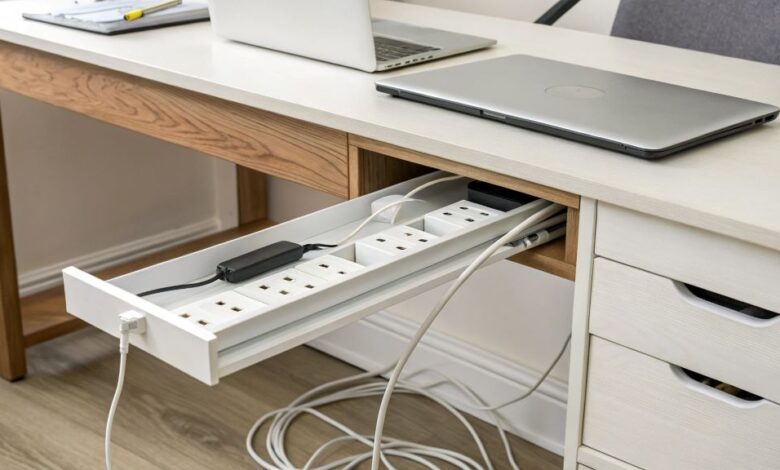
A cluttered desk disrupts productivity and drains energy. With the rise of electronic devices, managing cords and power sources is more crucial than ever. One small but impactful solution lies in the strategic placement of your power strip. This article dives deep into the best power strip placement tips for a clutter-free desk, combining practical advice with research-backed insights to help you reclaim your workspace.
Why Power Strip Placement Matters More Than You Think
The average office worker interacts with at least five devices daily, ranging from laptops to chargers and lamps. Each device needs power, making power strips essential. However, poorly placed power strips contribute to cable chaos. According to a survey by Staples, 67% of workers feel distracted by a cluttered workspace. Therefore, organizing power strips can reduce this distraction and increase focus.
Positioning your power strip optimally reduces cable length visibility and prevents tangling, which ultimately protects your devices. Additionally, it improves safety by minimizing trip hazards and the risk of accidental unplugging.
Best Power Strip Placement Tips for a Clutter-Free Desk
-
Mount Under the Desk for Invisible Power Access
Mounting your power strip underneath the desk is one of the most effective ways to keep cords hidden yet accessible. Use adhesive strips or brackets designed for mounting power strips. This technique reduces desktop clutter dramatically, creating a sleek, minimalist workspace. A study published by the Journal of Environmental Psychology notes that a tidy workspace can boost productivity by up to 15%.
However, ensure the strip remains easy to reach for plugging and unplugging. Avoid placing it too far back or under deep desks where access becomes a struggle.
-
Use Cable Management Channels Alongside Power Strip Placement
Power strips work best when paired with cable management solutions. Channels or trays installed beneath the desk guide cables neatly and prevent them from dangling. This method creates an organized “power hub,” ensuring all wires stay grouped and untangled. The synergy between cable management and power strip placement enhances desk aesthetics and reduces wear on cables.
-
Position Near Frequently Used Devices
Place the power strip close to devices you use often. For example, if you work primarily on a laptop and phone, position the strip near these devices’ charging ports. This minimizes cable length and avoids sprawling wires across your desk surface. Reducing visible cables also lowers cognitive distractions, as your brain doesn’t have to filter through visual noise.
-
Keep Away from Heat Sources and Moisture
Safety is paramount. Avoid placing power strips near heat sources like heaters or radiators, or close to any liquids such as coffee mugs or water bottles. Overheating can damage your power strip and pose fire hazards. Additionally, moisture exposure can cause electrical shorts. According to the Electrical Safety Foundation International, misplaced power strips cause thousands of preventable electrical fires annually.
-
Opt for Vertical or Surge-Protected Power Strips
The shape and function of your power strip impact placement options. Vertical power strips save desk space and allow for better cord routing. Surge-protected models safeguard your devices from power surges. When selecting a power strip, consider how the design fits your desk’s layout and power needs. Investing in a quality surge protector also prevents costly device damage.
-
Avoid Power Strips on the Floor
Many users simply place power strips on the floor. While convenient, this placement invites dust buildup and accidental kicks. Dust accumulation can impair electrical connections, and foot traffic risks unplugging or damage. Instead, elevating the power strip either on the wall or underside of the desk prolongs its lifespan and maintains order.

-
Label Your Cables and Power Ports
Labeling cables and corresponding power strip outlets helps keep track of what’s plugged in. This practice reduces the frustration of unplugging the wrong device and maintains system order. Labeling supports quick troubleshooting and enhances the efficiency of your setup.
Expert Opinions on Desk Organization and Power Strip Placement
Workspace experts stress the value of thoughtful power strip placement. According to Marie Kondo, author of The Life-Changing Magic of Tidying Up, a clear workspace clears mental clutter. Similarly, productivity guru David Allen highlights that managing your workspace environment directly impacts your task completion speed.
Technology blogs like Wirecutter recommend power strip placement as a key factor in cable management strategies. Their tests reveal that mounting strips under desks and combining with cable clips yields the cleanest results.
Real-World Example: A Home Office Transformation
Jessica, a graphic designer, struggled with tangled cords and limited desk space. After implementing these best power strip placement tips for a clutter-free desk — mounting her surge protector beneath the desk and using cable trays — she reported a 30% increase in focus and a far tidier workspace. This example shows how small adjustments can have significant effects.
FAQs About Power Strip Placement for a Clutter-Free Desk
Q1: What is the best location for a power strip on a desk?
A1: Under the desk near your devices provides easy access while keeping cords out of sight.
Q2: Can mounting a power strip damage my desk?
A2: Using adhesive mounts or brackets designed for power strips avoids damage and ensures a secure hold.
Q3: How do I keep cables from tangling around my power strip?
A3: Use cable clips, sleeves, or trays to bundle cables neatly and prevent tangling.
Q4: Is it safe to use multiple power strips on one desk?
A4: It’s best to avoid daisy-chaining power strips, which can overload circuits and pose fire risks.
Q5: Should I use surge protectors for all devices?
A5: Essential electronics benefit from surge protection to prevent damage from power spikes.
Q6: How often should I clean my power strip?
A6: Clean your power strip and surrounding area every few months to prevent dust buildup.
Q7: What length of power strip cord is ideal?
A7: Choose a cord length that reaches your outlet without excess slack, usually between 3-6 feet.
Final Thought
Creating a clutter-free desk starts with smart power strip placement. By mounting power strips under your desk, pairing them with cable management tools, and positioning them near your main devices, you create an organized, efficient workspace. This small change leads to reduced distractions, increased safety, and a sharper focus on tasks.
Read More:
How Remote Work Helps Reduce Overhead Costs for Small Businesses